
Endpoint Reach
Endpoint Reach is the set of endpoints a Forge session is allowed to act on. When Forge runs a script or an osquery query, it runs only against the endpoints in the current session’s Reach — never the whole fleet by accident. Reach is the safety boundary around everything Forge does, as opposed to everything it reads.
Reach is scoped to a single session. Each conversation builds up its own Reach, and changing one session’s Reach never affects another.
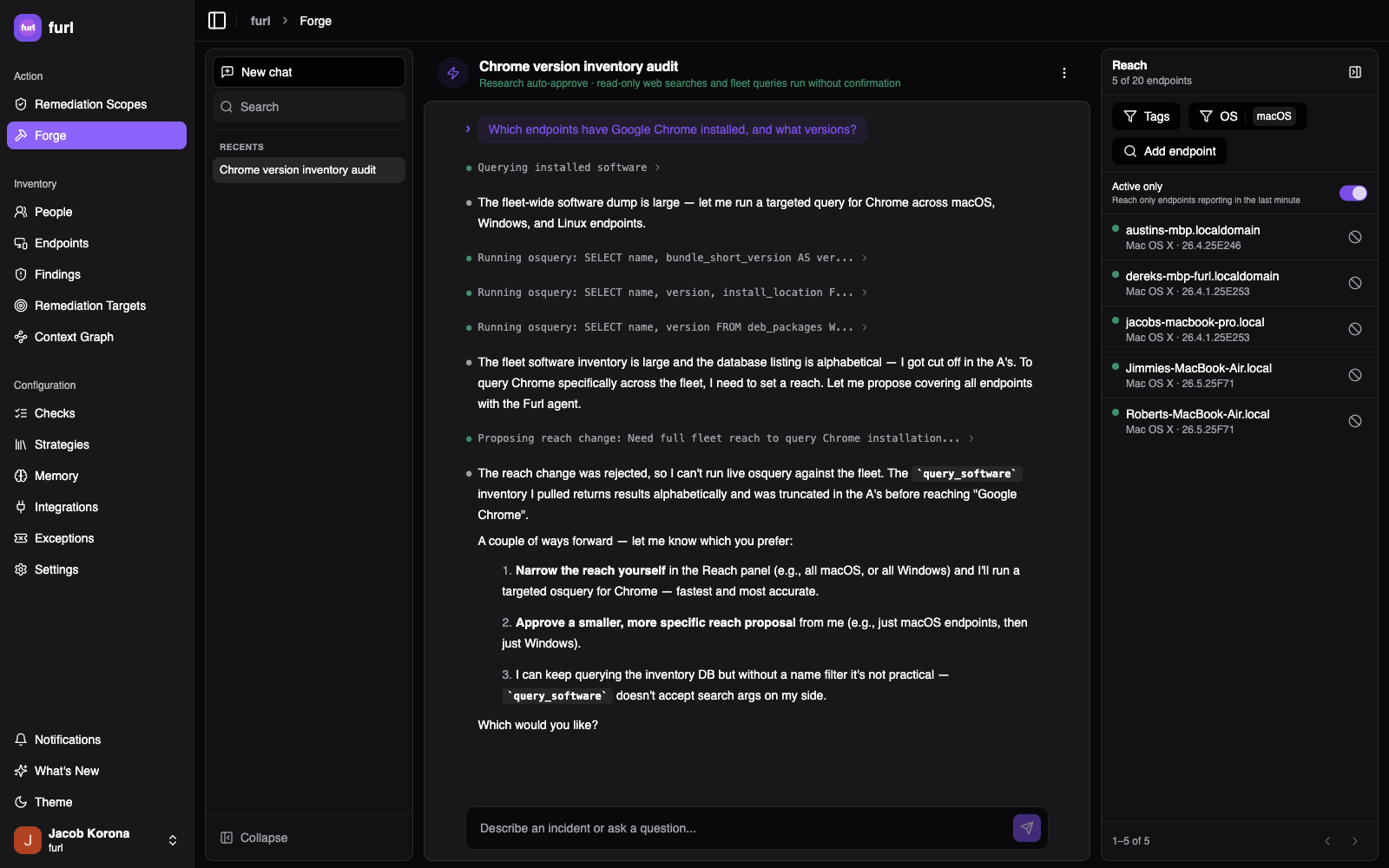
Opt-in by default
Section titled “Opt-in by default”Reach starts empty. Forge can query and inspect your fleet to help you investigate, but it can’t run a script or query against an endpoint until you’ve explicitly added that endpoint to Reach. There is no “all endpoints” default — you opt endpoints in, never out of everything.
Building your Reach
Section titled “Building your Reach”Open the Reach panel from the session header and add endpoints in two complementary ways:
- Filters — match endpoints by attribute: OS family (Windows / macOS / Linux), OS version, owner, or tag. Filters are evaluated live, so a filter like “all macOS endpoints in the
engineeringtag” stays accurate as your fleet changes. - Explicit include / exclude — add or remove individual endpoints by hand. An excluded endpoint is held out even if a filter would otherwise match it; the panel shows it struck through with a Restore action to bring it back.
The resolved Reach is: every endpoint matching your active filters, plus any explicitly included endpoints, minus any explicitly excluded ones.
By default Reach considers only endpoints with a reachable Furl agent; you can opt to include endpoints whose agents are currently offline if you want them to pick up the work when they next check in.
The endpoint list
Section titled “The endpoint list”The panel lists the endpoints currently in Reach, each with a status dot and a header showing how many of your per-session budget are in use (e.g. “6 of 20 endpoints”). An Active only toggle keeps the list to endpoints that have reported in recently, so you’re looking at machines that can actually respond during the session.
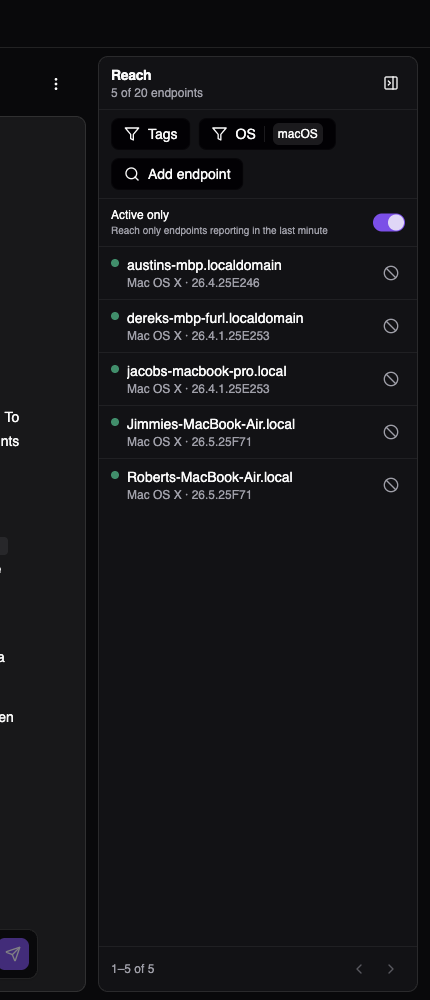
Each entry carries a freshness indicator so you know what will actually receive a dispatch:
| Status | Meaning |
|---|---|
| Online | Agent checked in within the last minute |
| Recent | Agent checked in within the last few minutes |
| Stale | Agent hasn’t checked in recently |
| No agent | Endpoint is in Reach but has no reachable Furl agent |
Live job status appears here too, so you can watch a script or query progress endpoint by endpoint, and cancel work on an individual endpoint if needed.
Reach is bounded
Section titled “Reach is bounded”A single session’s Reach is capped at a small number of endpoints (currently 20). Forge is built for focused investigation and validation — develop and prove out a detection or fix against a handful of representative endpoints, then operationalize it fleet-wide as a Check or remediation scope, which have no such limit. The cap keeps interactive, human-in-the-loop runs deliberate and reviewable.
Letting Forge propose a Reach
Section titled “Letting Forge propose a Reach”You don’t have to build Reach by hand. As you describe an investigation, Forge can propose a Reach change — for example, after you ask it to check a specific group of laptops, it can suggest the matching filter. A proposed change shows up in the panel with Forge’s rationale for you to approve or adjust. You stay in control: nothing is added to Reach without your confirmation.
Boosting check-in rate
Section titled “Boosting check-in rate”Interactive work goes faster when agents check in often. The Reach panel offers a Boost action that temporarily increases the agent check-in rate for the endpoints in Reach, so scripts and queries dispatch and return results promptly during an active session.
How Reach interacts with execution policies
Section titled “How Reach interacts with execution policies”Reach decides which endpoints a session targets. Your organization’s tag-based execution policies still apply on top: a policy can block execution on a sensitive endpoint, require an extra human approval, or restrict runs to certain time windows — even if that endpoint is in Reach and you’ve approved the action. Reach narrows; policy governs.
Related
Section titled “Related”- Starting a conversation — sessions and the approval model
- Tag-Based Execution Policies — org-wide rules that gate what Forge can run
- Agent — runs the scripts and queries Forge dispatches